# How To Use Claude To Create Viral UGC Videos

Learn how to use claude via UGCdrop MCP connection to create viral Tech ugc style videos that promote your product.

- **Reading time:** 2 minutes

## Content

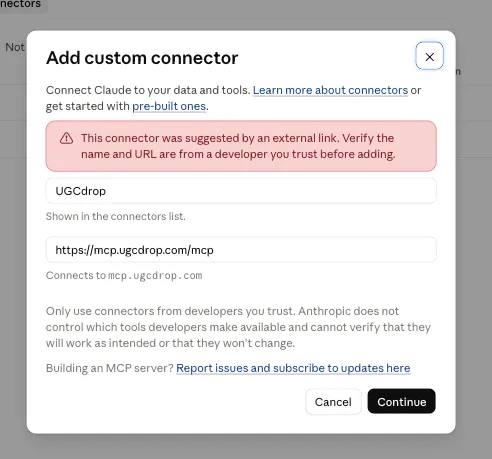
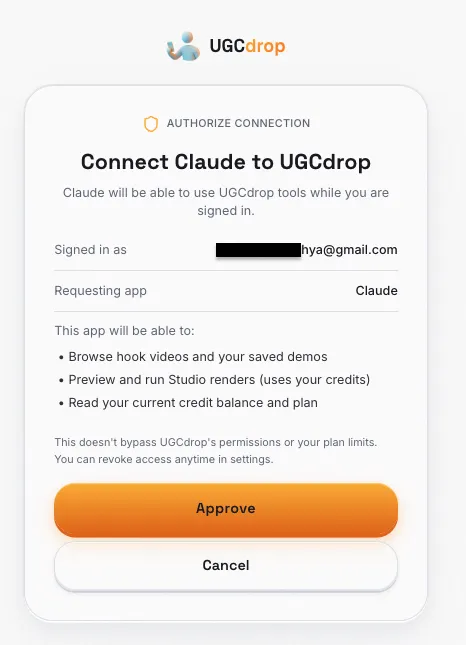
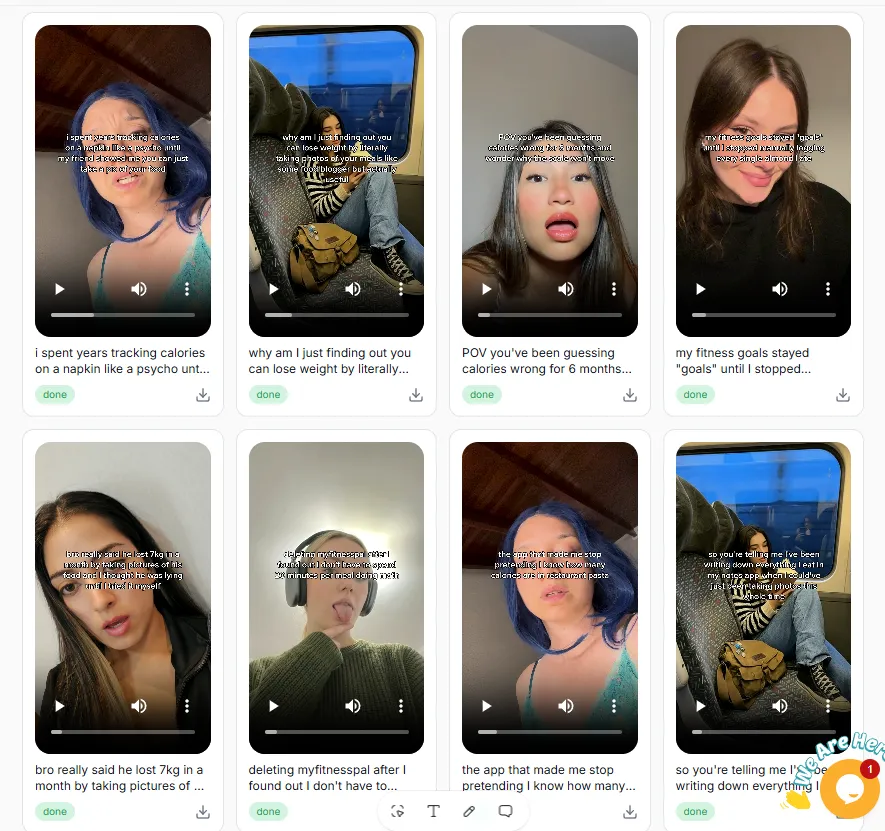
<h1><strong>Use Claude To Create Viral UGC</strong></h1><p><em>Generate UGC videos for your product just by chatting with Claude. Setup takes about 5 minutes.</em></p><h2><strong>What this does</strong></h2><p>Once MCP is connected, you can ask Claude to write hooks, pick trending audio, and render finished UGC videos for your product — all from a normal chat message. No editing software, no hiring creators.</p><!--video:claude-tutorial--><h2><strong>What you need</strong></h2><ul><li><p>A Claude account (claude.ai)</p></li><li><p>One short demo video of your product (10–20 seconds) (we can make it for you)</p></li><li><p>A UGCdrop account</p></li></ul><h1><strong>Setup</strong></h1><p><strong>Step 1: Add UGCDrop as a connector in Claude</strong></p><p>Press the button below to connect UGCdrop to Claude</p><p><a class="content-btn" href="https://claude.ai/new?modal=add-custom-connector&amp;connectorName=UGCdrop&amp;connectorUrl=https%3A%2F%2Fmcp.ugcdrop.com%2Fmcp#customize/connectors" target="_blank" rel="noopener noreferrer" contenteditable="false"><img src="https://cdn.ugcdrop.com/resources/1788800115164-claude-favicon.webp" alt="" class="content-btn-icon"><span>Connect UGCdrop to Claude</span></a></p><p><strong>Step 2: Press Continue and Approve</strong></p><img src="https://cdn.ugcdrop.com/resources/1788800390248-Screenshot_2026-09-07_at_22.29.18.webp" width="492" height="459"><p>Press Approve in the dialog box after continue:</p><img src="https://cdn.ugcdrop.com/resources/1788800311043-Screenshot_2026-09-07_at_22.27.06.webp" width="466" height="645"><p>If you don't have an account, create one by pressing "Sign up" or click the button below</p><p><a class="content-btn" href="https://ugcdrop.com" target="_blank" rel="noopener noreferrer" contenteditable="false"><img src="https://backend.ugcdrop.com/storage/v1/object/public/avatars/e4cf509c-aa3d-4d4c-bb81-e4cf29a616bd/resources/inline/1788800480436-ugcdrop-favicon.png" alt="" class="content-btn-icon"><span>Create Account in UGCdrop</span></a></p><p><strong>Step 3: Film a quick product demo</strong></p><p>Open your app and record yourself using one feature. Keep it simple:</p><ul><li><p>10–20 seconds long</p></li><li><p>Show one feature, not a full walkthrough</p></li><li><p>No need to show your face</p></li><li><p>Cut out pauses and dead time</p></li></ul><p>Upload this demo to your UGCDrop library — it's what gets combined with the UGC clips.</p><p><strong>Step 4: Ask Claude to make your videos</strong></p><p>In your Claude chat, just type something like:</p><p><em>"Make 5 videos about [your product] and send them to me."</em></p><p>Claude will write the hooks, pick the music, and confirm with you before rendering. If you're only using hooks you already own, this costs 0 credits.</p><p><strong>Step 5: Get your videos</strong></p><p>Once rendering is done, ask Claude to "check now, please." Your finished videos will be ready in your UGCDrop Studio at ugcdrop.com/studio.</p><img src="https://cdn.ugcdrop.com/resources/Screenshot-2026-07-24-144349.webp" width="885" height="831"><p><strong>Tip: </strong>Repeat step 4 anytime you want more videos — 5, 20, or 100 at once. The only manual work on your end is filming demos.</p><h1><strong>That's it</strong></h1><p>Film a demo, connect once, and let Claude handle the rest. Post the videos, drive traffic, repeat.</p><p>Below are real results following this strategy, generated in 2 weeks</p><img src="https://VidRain.b-cdn.net/Landingpage%20SC/Screenshot%202026-07-24%20144415.png"><p></p>

[View the live page](/free/How-To-Use-Claude-To-Create-Viral-UGC-Videos)