Meta Ads Library (2026): Find Winning UGC Ads
Meta Ads Library is Meta's free, public search tool for every active ad running on Facebook, Instagram, Messenger, WhatsApp, Threads and the Audience Network. Open facebook.com/ads/library, pick a country, search a brand or keyword, and you see its live ads with the date each one started. To find the winners, look for the ads that have been running the longest: nobody keeps paying for an ad that loses money.
TL;DR
What it is: a free database of all active Meta ads. No login and no ad account needed to search.
What it hides: spend, clicks and conversions for normal commercial ads. You get the creative, the copy, the platforms and the start date.
How to spot a winner: the oldest ad that is still active. Then confirm it with the "Impressions: high to low" sort, the number of copies, and EU reach data.
What to do with it: copy the format and the hook structure, not the footage. Rebuild it with your own clips and your own product demo.
Where UGCdrop fits
The Ads Library tells you what to make. It doesn't make it. Most winning ads for apps and digital products follow one shape: a real person on camera for two or three seconds, a text hook, then a screen demo. UGCdrop gives you the first part: 3,600+ real creator clips you can license from $0.50 per clip, plus a free editor (Studio) to add the hook and your demo.
It is not a spy tool and it won't analyze competitor ads for you. Use the library for research, then browse the clips when you're ready to build your version.
How to use the Meta Ads Library, step by step
Open it. Go to facebook.com/ads/library. Facebook Ads Library, FB Ads Library and Meta Ad Library are all the same tool.
Pick a country. The library guesses your location, so set it on purpose. Choose the market your competitor sells in, or "All".
Pick the ad category. Leave it on "All ads". The other options (Issues, elections or politics; Properties; Employment; Financial products and services) are special categories.
Search a brand or a keyword. Type a brand and pick its Page from the dropdown to see only that advertiser. Type a keyword ("calorie tracker", "budget app") to see every advertiser using it.
Filter. Set Media type to Videos and Active status to Active ads.
Sort. Use "Sort by" to switch between "Impressions: high to low" and "Most recent".
That's the whole tool. Searching is free and doesn't need a Facebook login. One exception: ads with age-restricted content, such as alcohol or gambling, are hidden from people who are logged out or underage, according to Meta's help center.
Every filter, and which ones matter for UGC
We checked every option in the live tool in October 2026. Here's what's there and what it's good for.
| Filter | Options | Use it for |
|---|---|---|
| Country | Any country, or All | See what runs in your market. EU countries add reach data. |
| Ad category | All ads, Issues/elections/politics, Properties, Employment, Financial products and services | Leave on All ads for product research |
| Language | All languages or one | Cut foreign-language versions of the same ad |
| Advertiser | Any Page in the results | Narrow a keyword search to one brand |
| Platform | Facebook, Instagram, Audience Network, Messenger, WhatsApp, Threads | Check whether a brand runs on Instagram (where Reels lives) |
| Media type | Images, images with little or no text, memes, images and memes, videos, no image or video | Pick Videos for UGC research |
| Active status | Active ads, inactive ads, active and inactive | Active for winners. Inactive mostly applies to political and EU ads. |
| Impressions by date | A date or date range | See what was showing during a season or a launch |
One filter is better than it looks. When you search a keyword and pick Videos, the library labels it "Keyword within video transcript or ad copy". So you can search for words people say out loud in the ad, not only words in the caption. Search a phrase your buyers say, like "I wish I'd found this sooner", and you find the ads built around it.
How to spot a winning ad: the longest-running ad wins
The library hides spend and results. So you have to read the signals it does show. Simonas, UGCdrop's founder, has run UGC ads for four years and uses the library to spy on competitors and copy what works. His rule is simple: look at which of a competitor's ads has been running the longest. That ad is most likely the most profitable one, because they haven't turned it off.
Ads cost money every day they run. Advertisers, and Meta's delivery system, cut losers fast. An ad that survives for months is paying for itself. Here's how to find it and check it.
1. Find the oldest active ad
Open the advertiser's Page in the library (search the brand, pick the Page). Every card shows "Started running on" with a date. Scan for the oldest date among active ads. On a big account, switch the sort to "Most recent" and scroll to the bottom.
2. Check it against "Impressions: high to low"
The library has a sort called "Impressions: high to low", and an advertiser's Page opens on it by default. Meta doesn't publish how this sort is calculated or which countries it counts, so treat it as a rough ranking, not data. But when the oldest ad also sits at the top of the impressions sort, you've found the winner.
3. Count the copies
Look for "2 ads use this creative and text" (or 3, or 10) on a card. That means the brand runs the same video in several ad sets. Also scan for the same hook or caption across many new Library IDs. Brands often duplicate a winner into fresh campaigns, which gives the copies a new start date. A concept that shows up dozens of times is being scaled.
4. Read the EU reach number
This is the one hard number most guides miss. For ads shown anywhere in the EU, Meta publishes extra data under "Transparency by location". Open "See ad details" and you get "EU ad delivery": the estimated number of accounts that saw the ad, broken down by country, age and gender. It covers normal product ads, not just political ones.
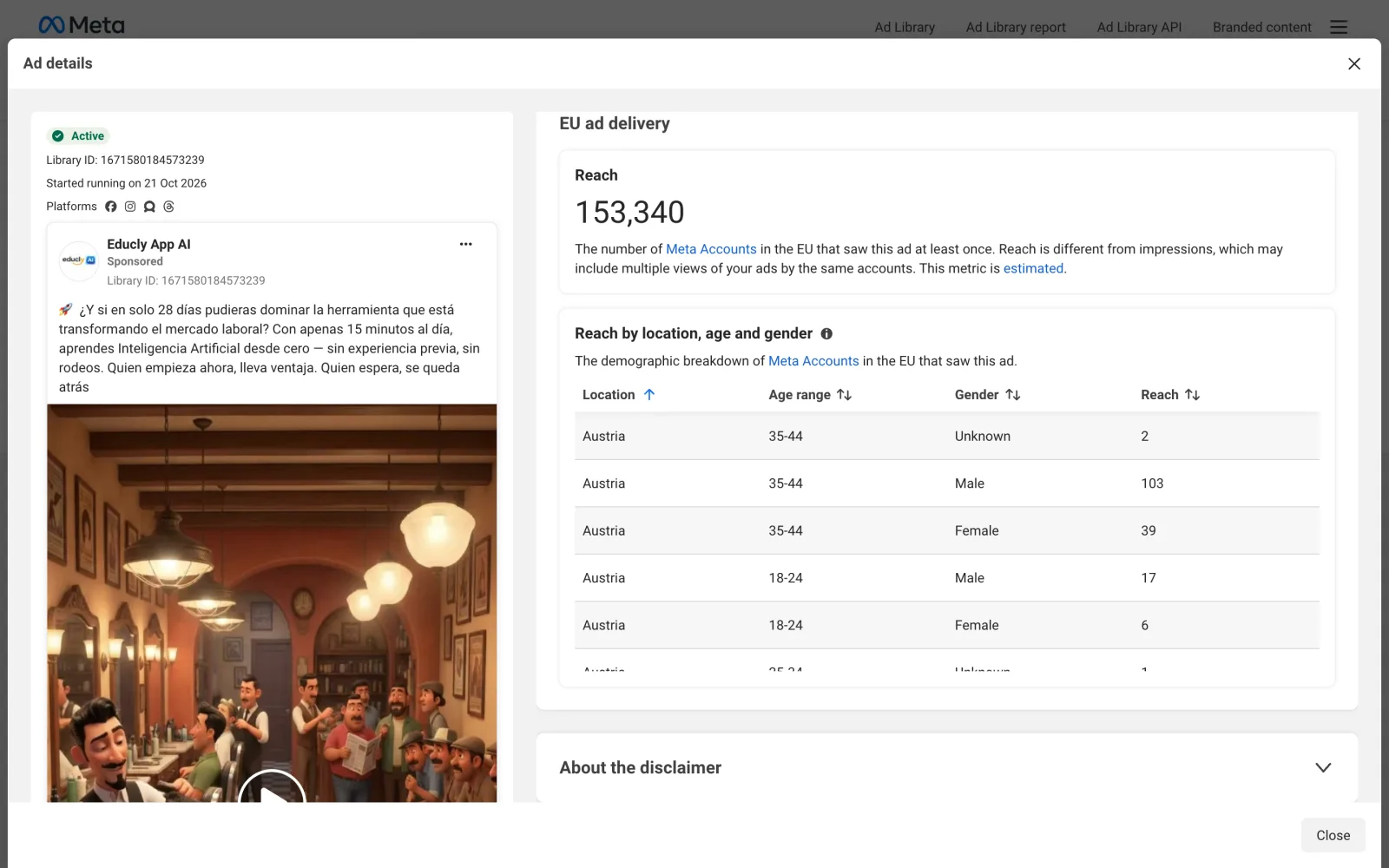
The ad above reached about 153,000 EU accounts in its first nine days. That's a real signal you can compare across a competitor's ads. Brands that only advertise in the US won't have this data.
When "longest-running" lies
Tiny evergreen ads. A small always-on retargeting ad can run for a year on a few dollars a day. If an old ad has no copies and sits low in the impressions sort, it's probably this.
Brand ads. Big companies keep awareness ads running for reasons that have nothing to do with sales.
New accounts. If every ad started last week, nothing has proven itself yet. Come back in a month.
So use run time first, then confirm it with at least one other signal. Run time alone is a strong hint. Run time plus copies plus top of the impressions sort is about as close to proof as public data gets.
A real example: Cal AI's longest-running ads
We ran this method on Cal AI, the AI calorie-tracking app, on October 30, 2026. Its Page had about 790 active ads in the US, around 670 of them videos.
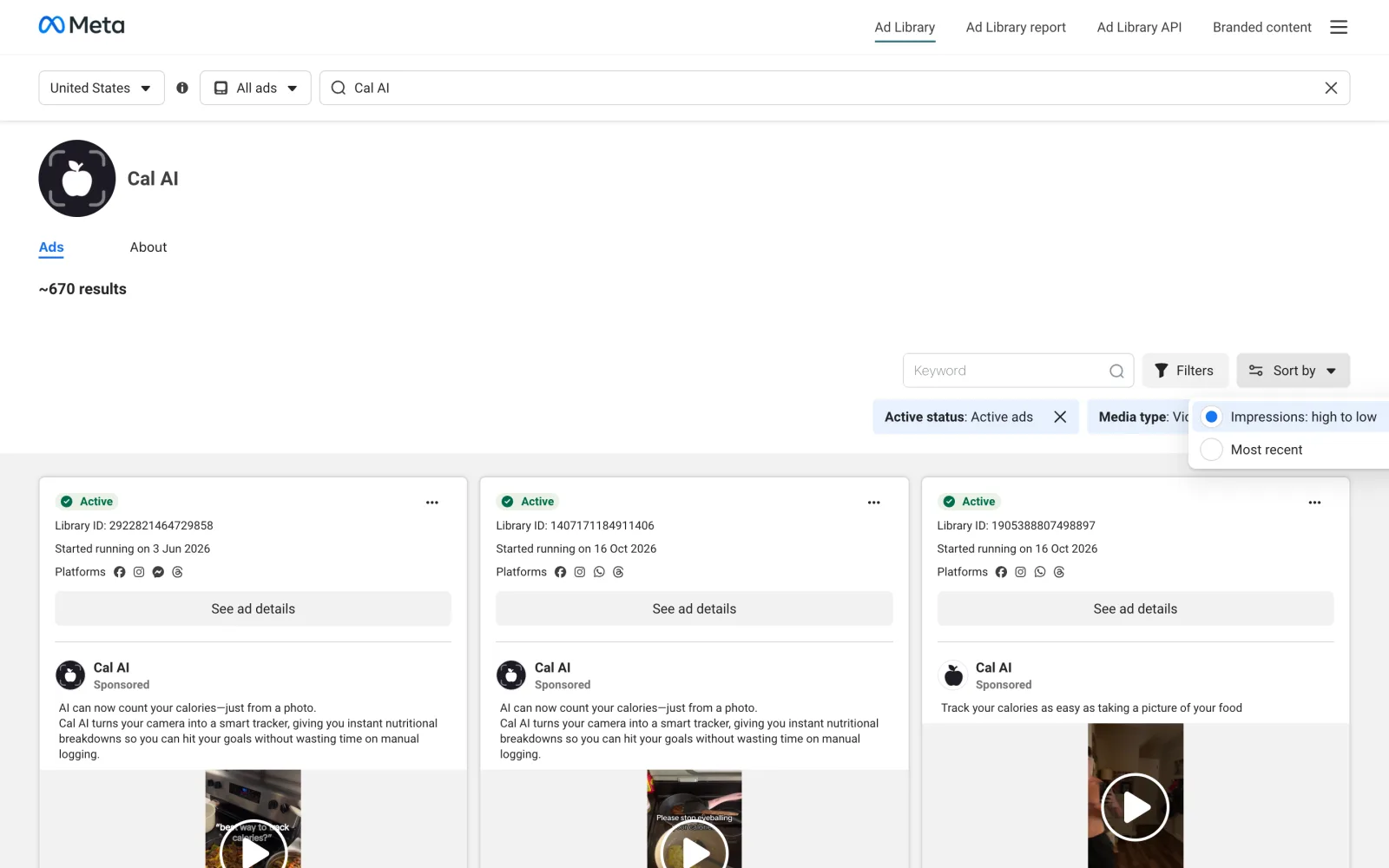
Sorted by "Impressions: high to low", the top ad started running on June 3, 2026. That's almost five months, and June 3 was the oldest start date we found among its active ads. Most of the ads around it started in late September or October. The June ads are the survivors. They also share their caption, about counting calories from a photo, with dozens of newer ads. Cal AI keeps scaling the same concept.
Here are two of those June 3 ads, frame by frame:
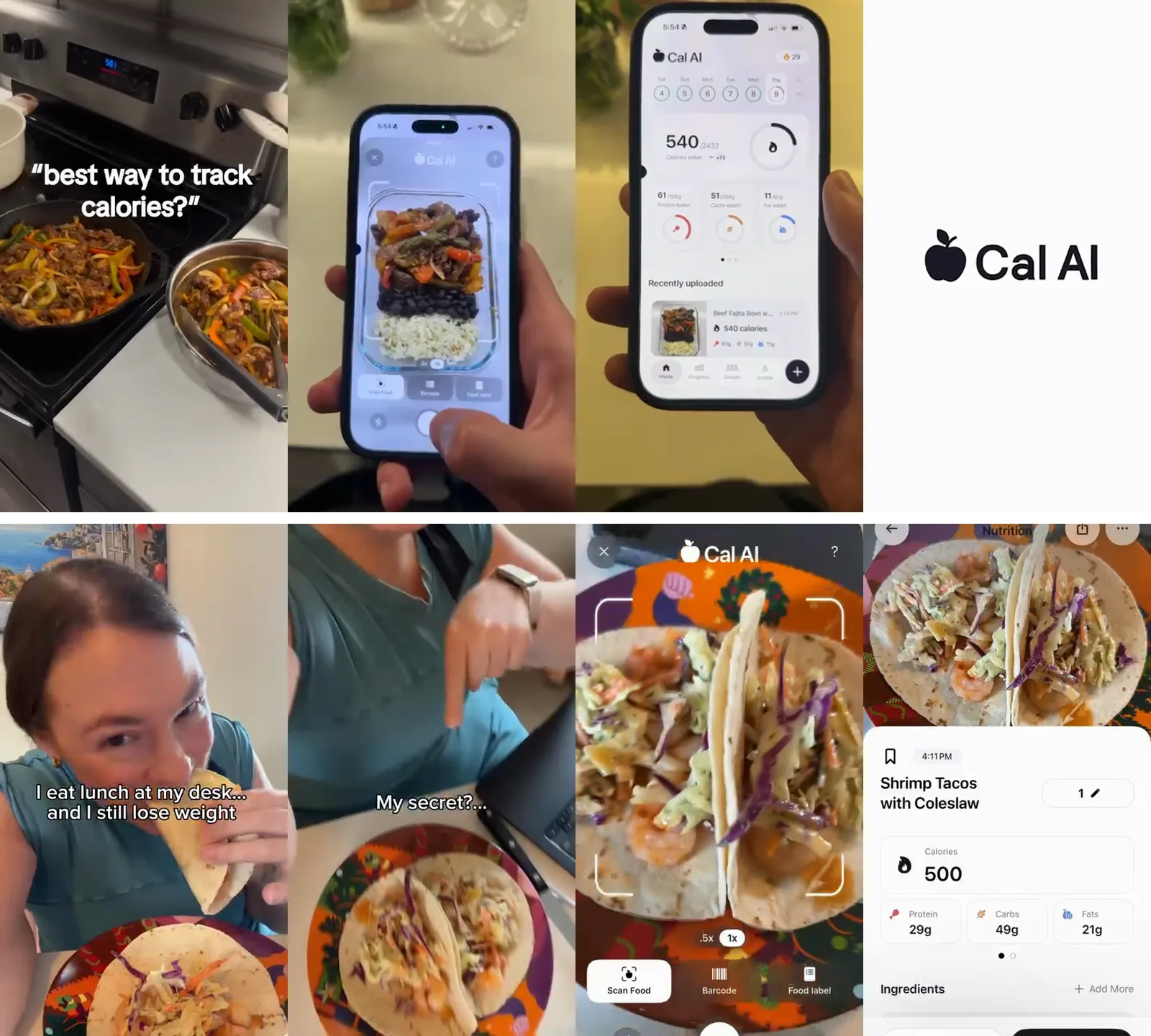
Ad 1 (9 seconds): a pan of fajitas on a home stove with the text "best way to track calories?". Then a hand scans the meal with the app, the app shows 540 calories, and the logo closes it.
Ad 2 (10 seconds): a woman eating tacos at her desk, filmed selfie-style, with "I eat lunch at my desk... and I still lose weight". Then "My secret?...", a scan of her plate, and the nutrition result.
Both follow the same three-part shape:
Hook (0 to 3 seconds): phone-shot footage of a real person or real moment, with one line of text. Ad 2 adds an open loop ("My secret?").
Demo (3 to 8 seconds): the product doing one thing, with a clear result on screen (a calorie number).
End card: the logo. No long pitch.
No studio, no actors, no voiceover script. That's the format Simonas sees winning again and again for apps and digital products, and it's the one he built UGCdrop around.
How to break down any winning UGC ad
Once you've found a winner, write down five things. Watch only the first three seconds for the first two.
| What to note | Question to ask | Cal AI example |
|---|---|---|
| Hook visual | What's on screen in the first second? | Real person eating at a desk |
| Hook text | What's the one line, and whose words is it in? | "I eat lunch at my desk... and I still lose weight" |
| Format | How is the product shown? | Phone scan, then result screen |
| Length | How long is the whole ad? | 9 to 10 seconds |
| CTA | What's the offer? | "Limited Time Free Trial", App Store link |
Simonas's point: the library shows you which hooks work and which content converts. He reuses those hooks in organic posts too, not just in ads. A hook that keeps a paid ad alive for five months will usually work on TikTok or Reels as well. For more hook patterns, see our guide to writing ad hooks or the 50+ UGC ad hooks list.
A 30-minute weekly research routine
Pick five advertisers. Three direct competitors and two brands outside your niche that sell to the same buyer. Bookmark their Ad Library Page links.
Find each one's oldest active video. Note the start date and whether it's at the top of the impressions sort.
Log it in a sheet. Columns: brand, Library ID, start date, hook visual, hook text, format, length, copies. The Library ID lets you reopen the exact ad later.
Note what disappeared. If an ad you logged last week is gone, it probably failed. That's the only "loser" data you'll ever get, and you only get it if you keep a log.
Make one new ad a week from the most common pattern in your sheet.
Two more searches are worth a few minutes: a keyword search for your category with Media type set to Videos (to catch advertisers you didn't know about), and a search for phrases your buyers use (which hits video transcripts).
What the library won't tell you
No spend or results for normal ads. You only get spend and impression ranges for ads about social issues, elections or politics.
No history for normal ads outside the EU and UK. When a regular ad stops, it leaves the library. Political ads stay for seven years. Ads delivered in the EU stay for one year after their last impression (Meta Transparency Center).
No video download button. You can download your search results if you're logged in, but there's no button to save an ad's video. And even if you grab it, the footage belongs to the brand and its creators. Don't run it.
No targeting, except the EU data (location, age and gender).
About the Ad Library API: it covers political ads worldwide from the past seven years, and ads of any type delivered to the UK or EU in the past year. You need to confirm your identity first, the same check political advertisers go through (Ad Library API). For US-only commercial ads, the API won't help.
When the free library is enough, and when to pay
For most small teams, the free library is enough. Five competitors, one sheet, 30 minutes a week. That beats most paid tools that people sign up for and stop opening.
Paid spy tools (Foreplay, Atria, Motion and others) help when you track dozens of brands, need to save ads before they vanish, or want to search across months of history. They can't show you spend either, because Meta doesn't publish it. Pay when saving and organizing becomes the bottleneck, not before.
And remember the library only covers Meta. For TikTok, use TikTok's own Creative Center and Top Ads.
How to turn a winning ad into your own in UGCdrop
Simonas's advice is to copy what works. In practice that means copying the structure: the type of hook shot, the hook line pattern, the demo style and the length. Don't reuse a competitor's footage or word-for-word script.
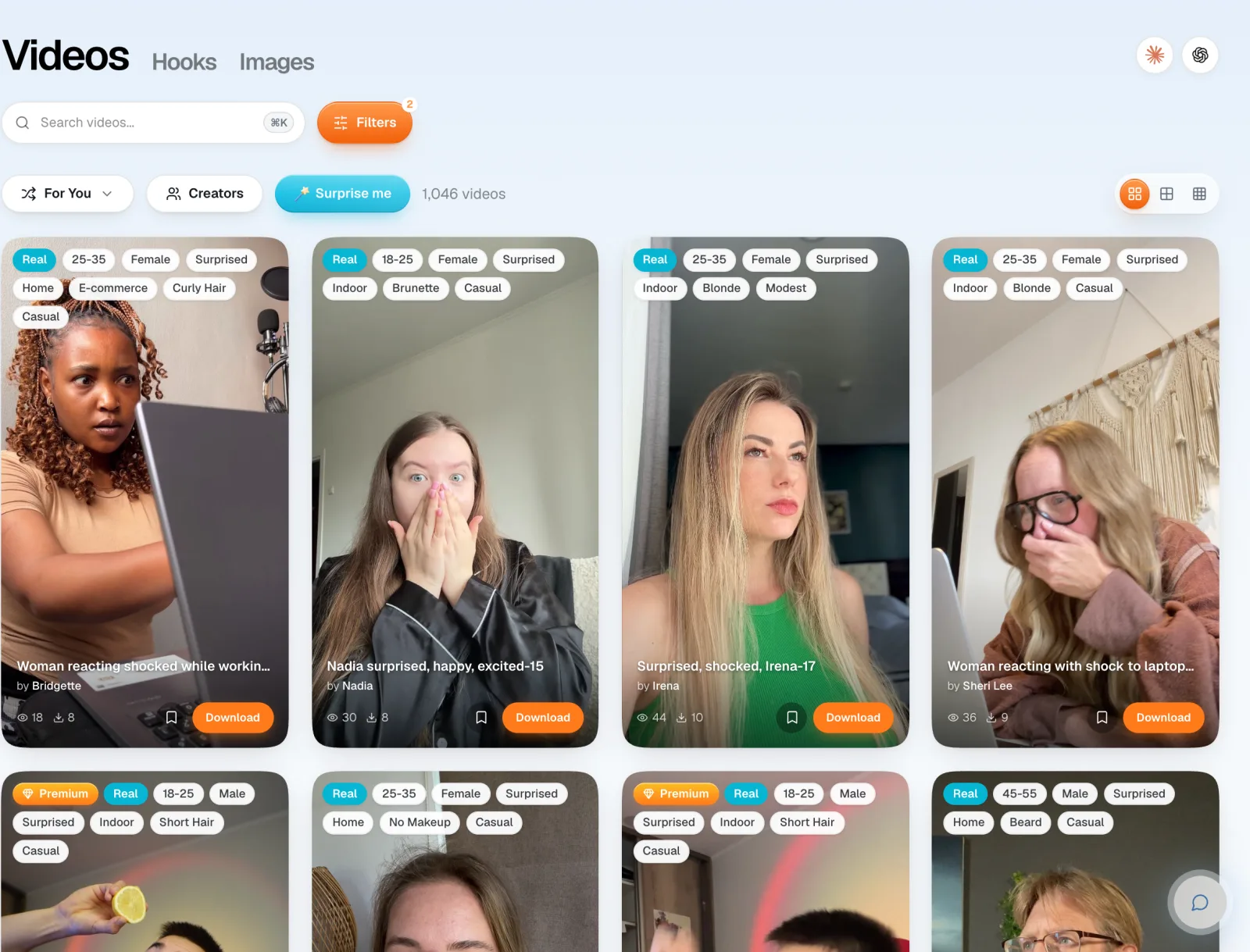
Match the hook shot. If the winner opens on a person reacting at a laptop, find the same in the UGC video library. Filter by emotion and setting, and use the Real filter for real creators. Surprised, shocked and excited reactions are the most-downloaded clips in the library.
Rewrite the hook line. Keep the pattern, change the words to your product. "I eat lunch at my desk and still lose weight" becomes "I do my taxes in bed and still file on time". Or browse the 4,600+ ready-made hooks in Studio (included on paid plans).
Record your demo. One to three steps, one clear result on screen. A screen recording is enough. For apps, the Demo Creator can turn screenshots into a demo.
Assemble and export. In Studio go Hooks, Library, Demos, Music. Keep it under 15 seconds like the winners. Rendering is free. Only downloads use credits.
Launch three versions. Same demo, three different hook clips. Then check your own ads in a month. The one still running is your winner.
More on running UGC on Meta: UGC for Meta ads. Need cheap clips for testing? See UGC stock videos.
FAQ
Is the Meta Ads Library free?
Yes. Anyone can search it at facebook.com/ads/library without an ad account or a Facebook login. You only need to log in to download search results or to see age-restricted ads.
How do I use the Facebook Ads Library?
Pick a country, leave the category on "All ads", and search a brand name or keyword. Then filter Media type to Videos and Active status to Active ads. Each card shows the ad, its platforms and the date it started running.
Can I see how much competitors spend?
No, not for normal product ads. Spend and impression ranges are only shown for ads about social issues, elections or politics. For ads shown in the EU, you can see estimated reach.
How do I find a competitor's best-performing ads?
Find their oldest ad that is still active. Ads that keep running for months are almost always profitable. Confirm it with the "Impressions: high to low" sort and by checking whether the same creative runs in several ads.
Can I download videos from the Meta Ads Library?
There's no download button for ad videos. Logged-in users can download search results. Third-party extensions exist, but the footage still belongs to the advertiser, so use it for reference only.
Does the library show Instagram ads?
Yes. The Instagram ads library is the same tool. Filter Platform to Instagram to see only ads that run there.
How far back does the Meta Ads Library go?
Normal ads show only while active. Ads delivered in the EU stay for one year after their last impression. Ads about social issues, elections or politics stay for seven years.
Bottom line
The Meta Ads Library is free and shows every live ad, but not which ones work. The fix is Simonas's rule: the longest-running ad is the likely winner. Check it against the impressions sort, copies and EU reach, break it into hook, demo and CTA, then rebuild that structure with your own footage. Cal AI's five-month-old winners are nine seconds long: a real person, one line of text, a demo, a logo. You can make that today.
Browse 3,600+ real creator clips · Build the ad in Studio · See pricing