TikTok Safe Zone (2026): Reels & Shorts + Template
TikTok safe zone is the part of a 9:16 video that the app's buttons, username and caption don't cover, so your text and faces stay visible. On a 1080 x 1920 frame, keep key elements between 288 and 1248 pixels from the top and between 120 and 888 pixels from the left, and they'll be clear on TikTok, Instagram Reels, Facebook Reels and YouTube Shorts. Below are the official numbers for each platform, where they come from, and a free overlay template.
TL;DR
Instagram and Facebook Reels and Stories (official): Meta says keep the top 14%, the bottom 35% and 6% on each side clear. On 1080 x 1920 that's 269 px top, 672 px bottom, 65 px sides.
YouTube Shorts ads (official): Google's template keeps 288 px top, 672 px bottom, 48 px left and 192 px right clear.
TikTok: TikTok publishes its safe zone as downloadable overlay files, and the zone gets smaller as your ad caption gets longer. The pixel numbers you see online are third-party measurements, and they disagree.
One template for all: a 768 x 960 px box from x 120 to 888 and y 288 to 1248. Put your hook text in its upper half and the face in the middle.
Where UGCdrop fits
UGCdrop's Studio builds ads on a 1080 x 1920 frame and already places hook text inside the safe zone, so it doesn't get clipped by the caption or the buttons. If you edit elsewhere, use the template below. You don't need UGCdrop to get safe zones right.
What a safe zone is, and why it costs you clicks
Every short-video app draws its interface on top of your video: the account name and audio label at the top, the like, comment and share buttons down the right side, and the caption and call-to-action button at the bottom. Anything you put there is covered or cut off.
In an ad, that's expensive. Your hook text is the reason people stop scrolling. If half of it sits under the caption, the ad fails in the first second and you never find out why.
Meta has numbers on this. In a meta-analysis of 15 split tests published on its Reels ads page, Reels ads built as 9:16 video with sound and key elements in the safe zone had a 34.5% lower cost per result than image ads on Reels. That compares a whole creative approach with static images, not safe zones alone. But Meta lists the safe zone as one of the three things that made the difference, next to the vertical format and audio.
Simonas, UGCdrop's founder, has run UGC ads for four years. The safe-zone mistakes he sees most:
Text that's too big. A hook that fills the width runs into the side icons and wraps into the caption area.
The main subject off-center. When the face or product isn't where the viewer's eyes naturally rest, the video feels jumpy and people don't focus on the content.
Ignoring the safe zone entirely. Designing on a clean preview, then discovering the caption sits on top of the hook after launch.
His fix is simple: put a safe-zone overlay on top of your timeline in your editor, CapCut or any other, and design inside it.
TikTok safe zone (2026)
TikTok doesn't publish its ad safe zone as pixel numbers. Its ad spec pages (for example Auction In-Feed Ads and TopView) link to downloadable safe-zone files, and they say the safe area depends on the video's dimensions, the caption length, and any add-ons you use. The longer the caption, the smaller the safe zone. TikTok also notes that the in-feed safe zone is stricter than the TopView open screen.
We couldn't download TikTok's files when writing this (TikTok's ads site wasn't reachable from our test location), so we won't invent numbers. Here's what popular third-party guides say for a 1080 x 1920 frame:
| Source | Top | Bottom | Left | Right |
|---|---|---|---|---|
| Orson Lord overlays | 160 px | 480 px | 120 px | 120 px |
| Ignite Social Media | 108 px | 320 px | 60 px | 120 px |
| Ramdam Creator School | 130 px | 250 px | Center 80% of the width | |
| Zeely | 150 to 200 px | 250 to 300 px | Not given | About 120 px |
They disagree by up to 230 pixels at the bottom. That's why we recommend designing to the stricter universal zone below, which clears every one of them. For TikTok ads with long captions, check the real preview in TikTok Ads Manager before you export a batch.
Organic vs ads: organic TikToks have no call-to-action button, so the bottom is a little less crowded. Design to the ad safe zone anyway. If an organic post takes off and you want to run it as an ad, you won't need to re-edit it.
Instagram Reels and Stories safe zone
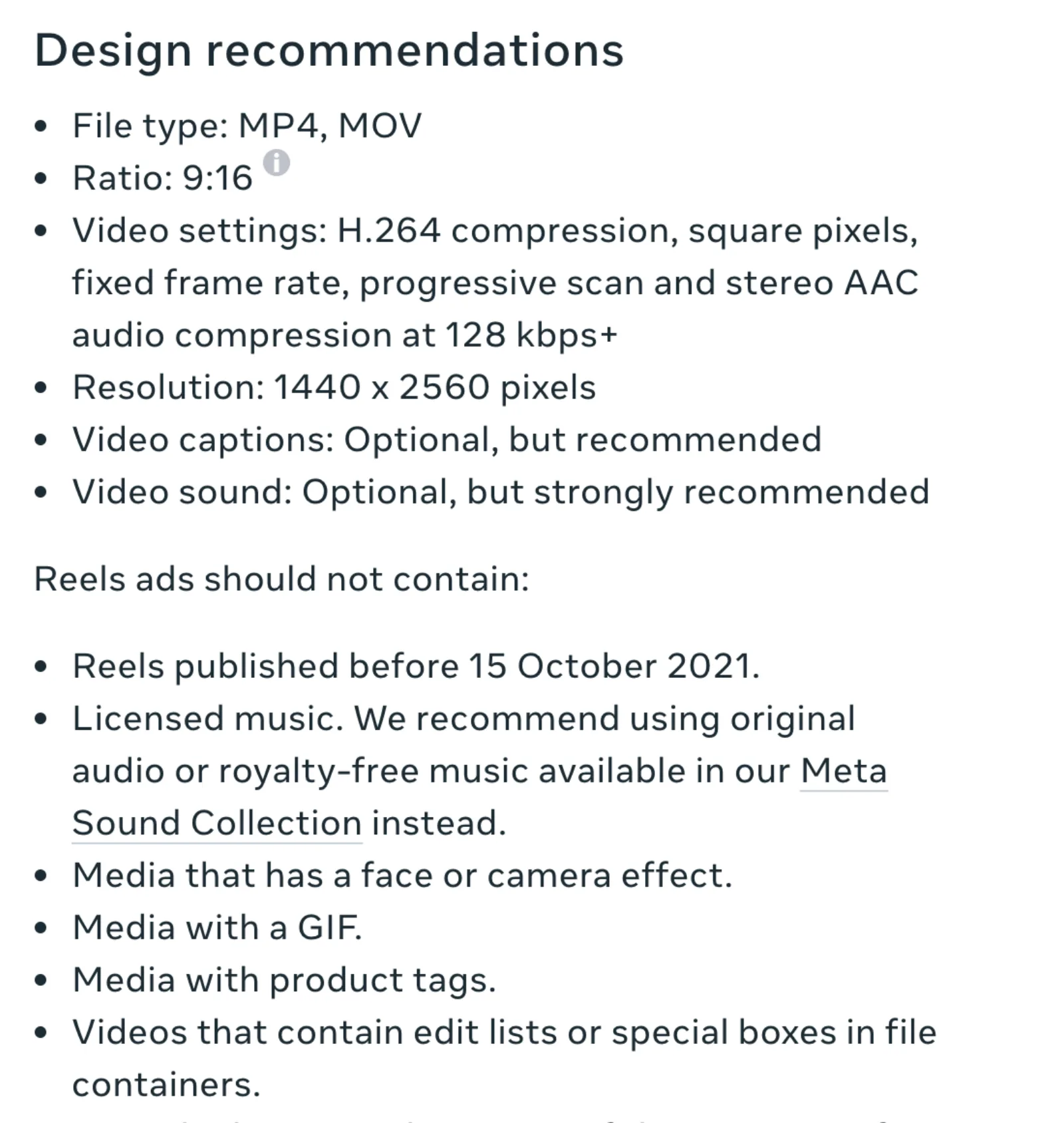
This one is official. On every 9:16 placement in the Meta Ads Guide, Meta says to leave roughly the top 14%, the bottom 35% and 6% on each side free of text, logos and key elements, so they aren't cropped or covered by the profile icon or call to action.
| Frame | Top (14%) | Bottom (35%) | Each side (6%) | Safe area |
|---|---|---|---|---|
| 1080 x 1920 | 269 px | 672 px | 65 px | 950 x 979 px |
| 1440 x 2560 (Meta's recommended size) | 358 px | 896 px | 86 px | 1268 x 1306 px |
Notice how big the bottom is. Many third-party Reels templates use 250 to 420 px at the bottom. Meta's own number is 672 px. If you follow a smaller template, your text can land under the caption and call-to-action button on Reels ads. Meta also offers a Reels safe zone checker template (PowerPoint, Photoshop and Keynote files) on its Reels ads page.
Facebook Reels and Stories (Meta safe zones)
Same rule. The Ads Guide pages for Facebook Reels, Facebook Stories and Instagram Stories all give the same 14% top, 35% bottom and 6% sides guidance. One Meta template covers all four placements. Meta recommends 9:16 for every one of them.
YouTube Shorts safe zone
Google publishes an exact template for vertical video ads in its video ad specs. On a 1080 x 1920 frame, keep logos, products and text inside the red area:
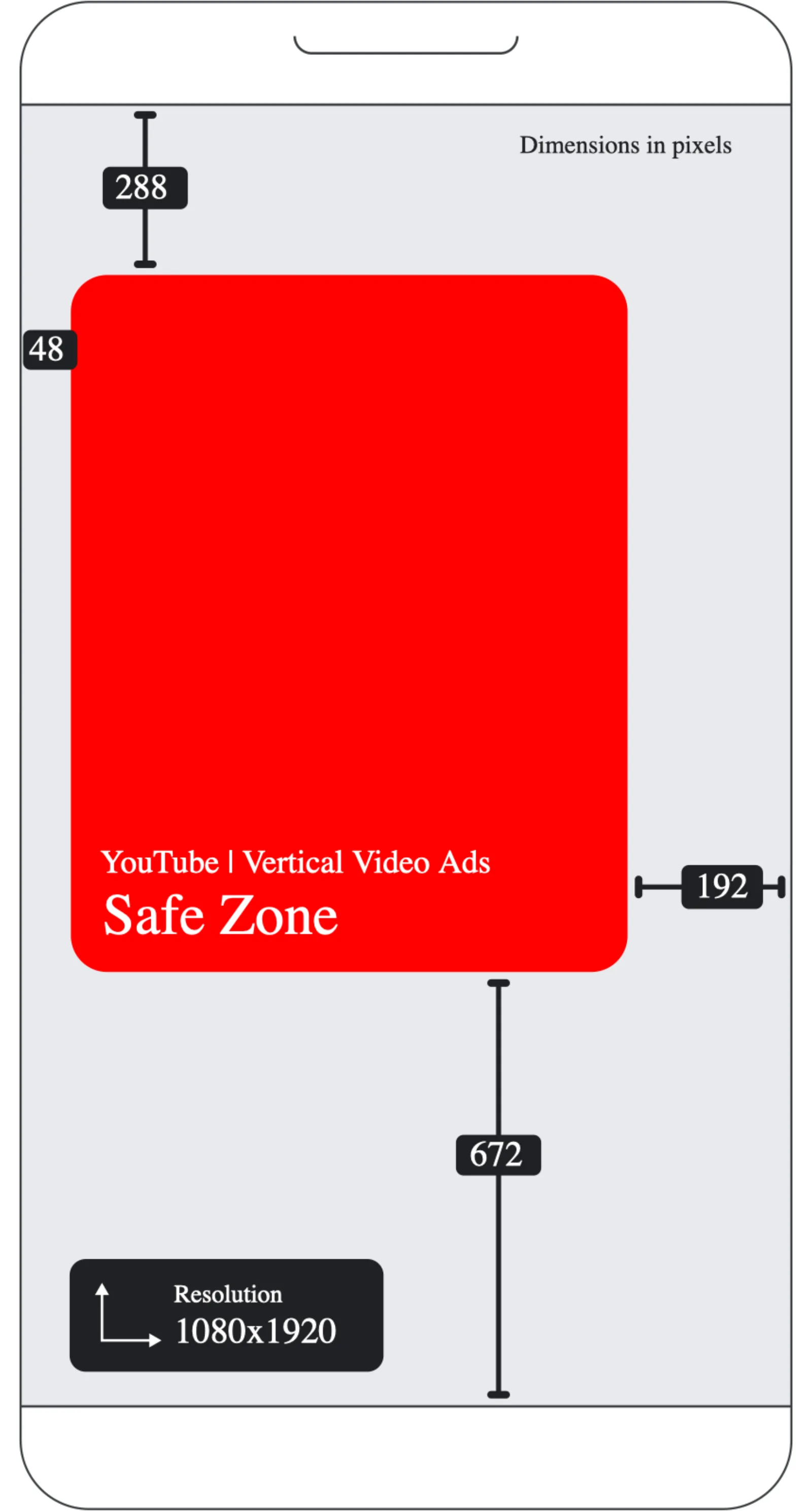
Top: 288 px
Bottom: 672 px
Left: 48 px
Right: 192 px (the action buttons)
Safe area: 840 x 960 px, shifted to the left
Google also offers transparent PNG templates for vertical, horizontal and square videos on the same page. Note that this is the template for ads. Organic Shorts have a similar layout, but Google doesn't publish separate numbers for them.
The universal safe zone (one template for every platform)
If you post the same video everywhere, take the strictest edge from each source:
| Edge | Universal value | Strictest source |
|---|---|---|
| Top | 288 px | YouTube (Meta is 269 px) |
| Bottom | 672 px | Meta and YouTube (35%) |
| Left | 120 px | Third-party TikTok guides (Meta is 65 px, YouTube 48 px) |
| Right | 192 px | YouTube (third-party TikTok guides: about 120 px) |
| Safe area | 768 x 960 px | x 120 to 888, y 288 to 1248 |
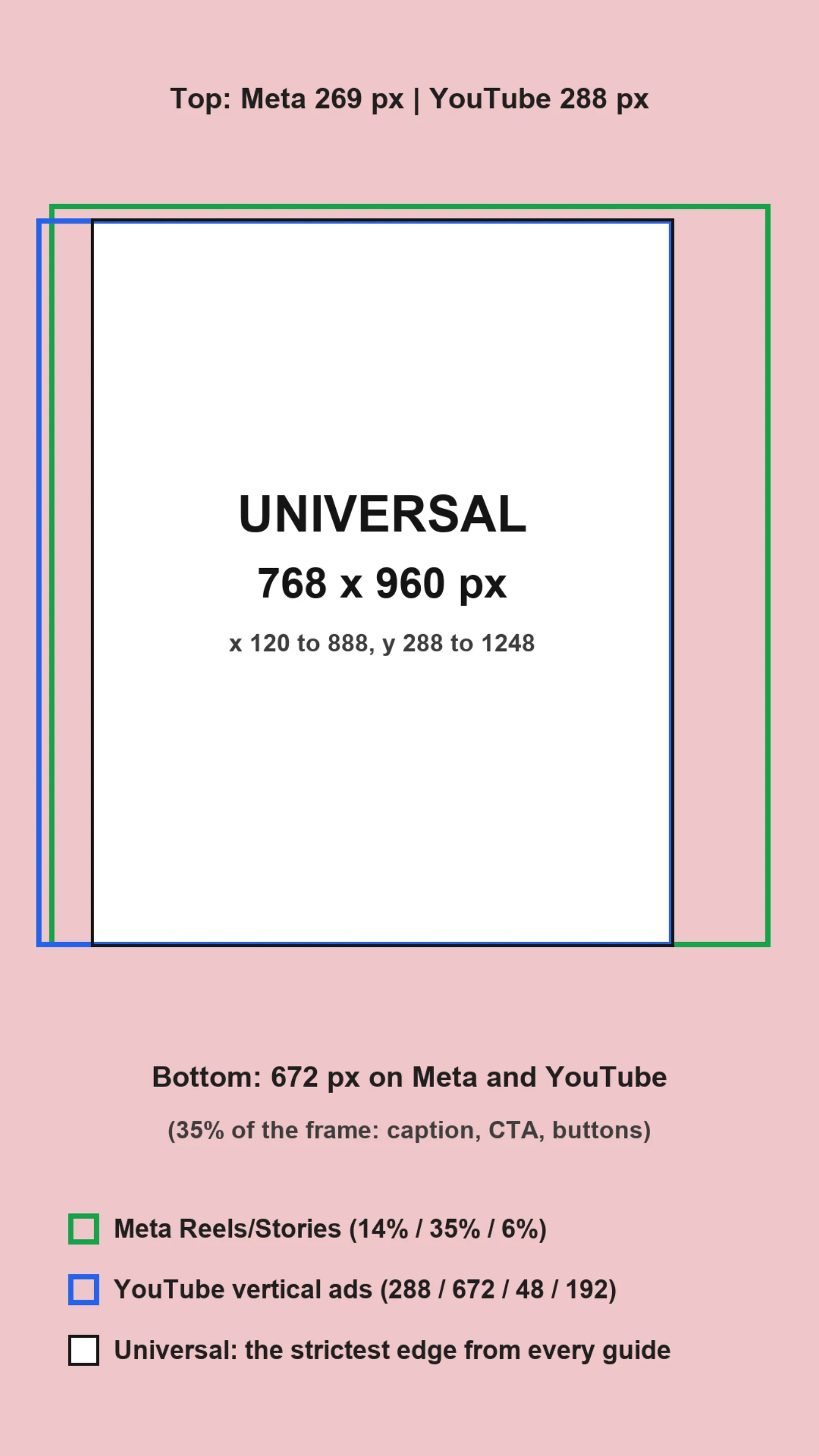
It looks small. It's enough for a two-line hook and a face. And because the center of the box sits slightly left of the frame's center, faces placed in the middle of the screen still fall inside it.
Free safe zone template (PNG overlay)
Here's the universal zone as a transparent 1080 x 1920 PNG. Save the image, drop it on the top track in CapCut, Premiere, Final Cut or DaVinci Resolve, set it to full frame, and hide it before you export.

For platform-specific checks, use the official files: Meta's Reels safe zone checker and Google's PNG templates (linked above), and TikTok's safe zone downloads in its ad spec pages.
Checklist before you export
Hook text sits in the upper half of the safe area, not at the very top (the account name lives there).
Text size: two lines at most, and not wider than the safe box. If it touches the edges, make it smaller.
Face or product sits in the middle of the frame, where the eye rests.
Nothing important in the bottom 35%: no logo, no price, no subtitle line you need people to read.
Captions (auto-subtitles) sit above the 1248 px line, not in the usual bottom position.
Preview on a real phone or in Ads Manager with your actual caption length, then export.
When a template is enough, and when you need more
For organic posts and most UGC ads, a universal overlay is enough. It's free, it works in every editor, and it takes ten seconds to add.
You need more when you run ads with long captions, add-ons like download cards or interactive stickers, or placements with different layouts (TopView, in-stream). Then check each platform's own preview, because the covered area changes with those settings. And if you build a lot of ads, it's worth using an editor that keeps text in the safe zone for you, so you're not checking every export by hand.
How to make safe-zone-ready UGC ads in UGCdrop
Pick a hook clip. Browse 3,600+ real creator clips in the UGC video library. Clips are vertical, filmed the way people film themselves on a phone.
Type your hook. In Studio, write your line. Studio places it inside the safe zone, above the caption area. Keep it short, Simonas's first rule.
Add your demo and music. Studio's steps are Hooks, Library, Demos, Music.
Render and check. Rendering is free. Only downloads use credits. Preview the result with your real caption before launch.
Need help with the hook itself? See how to write TikTok and Instagram ad hooks. For running the ads: UGC for TikTok ads and UGC for Meta ads.
FAQ
What is the TikTok safe zone?
It's the area of a 9:16 TikTok video that isn't covered by the username, caption, buttons or call to action. Keep text, faces and logos inside it so they stay visible.
What are the TikTok safe zone dimensions in 2026?
TikTok publishes its safe zone as downloadable overlays, and the size changes with caption length. Third-party guides put it at roughly 108 to 160 px from the top, 250 to 480 px from the bottom and about 120 px from the right on 1080 x 1920. To be safe everywhere, use 288 px top, 672 px bottom, 120 px left and 192 px right.
What is the Instagram Reels safe zone?
Meta says to keep the top 14%, bottom 35% and 6% on each side clear. On 1080 x 1920 that's 269 px top, 672 px bottom and 65 px on each side, leaving a 950 x 979 px safe area.
Is the safe zone the same for Reels and Stories?
Yes, on Meta. The Ads Guide gives the same 14% / 35% / 6% guidance for Instagram Reels, Instagram Stories, Facebook Reels and Facebook Stories.
What is the YouTube Shorts safe zone?
For vertical video ads, Google's template keeps 288 px top, 672 px bottom, 48 px left and 192 px right clear on 1080 x 1920. That leaves an 840 x 960 px safe area.
Is there one safe zone for TikTok, Reels and Shorts?
Yes, if you take the strictest edge from each: 288 px top, 672 px bottom, 120 px left and 192 px right. That leaves a 768 x 960 px area that works on every platform.
How do I add a safe zone overlay in CapCut?
Import the transparent PNG template, put it on a track above your video, stretch it to full frame and lower its opacity if needed. Design inside the box, then delete or hide the overlay before you export.
Bottom line
Meta and Google publish exact safe zones. TikTok publishes overlay files that change with your caption, and third-party numbers for it disagree by hundreds of pixels. So design once to the universal zone: 288 px top, 672 px bottom, 120 px left, 192 px right. Keep the hook short, the face centered, and nothing important in the bottom third. That fixes the two mistakes Simonas sees most.
Browse 3,600+ real creator clips · Make safe-zone-ready ads in Studio · See pricing