UGC for Apps (2026): Reaction + Demo Ads That Sell
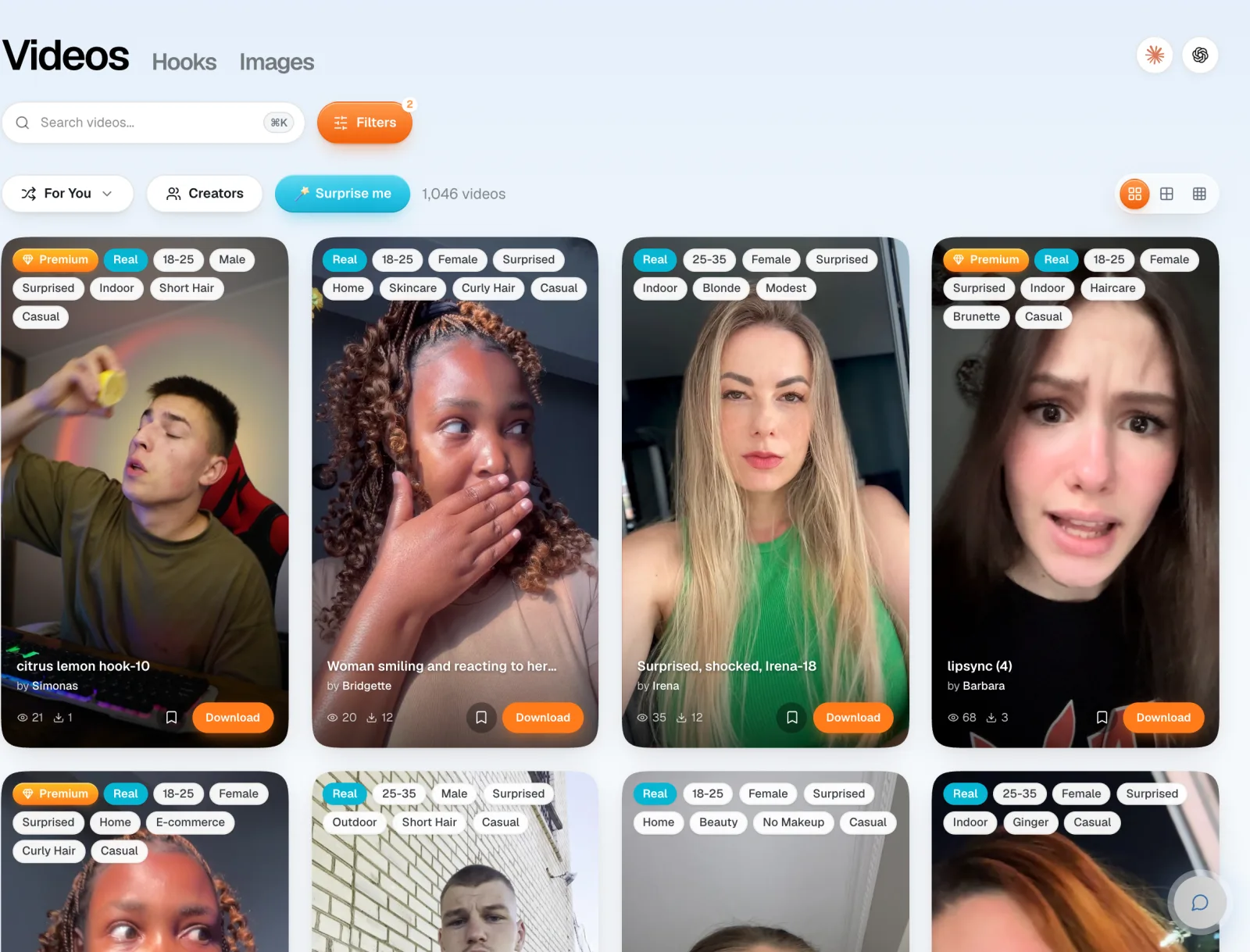
UGC for apps is creator-style video that sells a mobile or web app: a real person's reaction as the hook, then the app on a phone screen doing one useful thing. Apps are the easiest product to sell this way, because the payoff fits on a screen. On UGCdrop you can build these ads from 3,600+ real creator clips, starting at $0.50 per clip.
TL;DR
The format: a 2 to 3 second reaction with a text hook, then a short screen demo of your app, over trending audio.
Why apps win: you don't need anyone to hold or use a product. A screen recording shows the payoff, so you can make many versions fast.
What it costs: around $100+ per video from a hired creator, from $0.50 per clip with a UGCdrop plan.
The rule: test lots of hooks and faces, then double down on the winner.
Best pick: UGCdrop
UGCdrop is built for exactly this format. Pick a real creator reaction from the library, write a hook, drop in your app demo, and render in Studio. Rendering is free. Only downloads use credits.
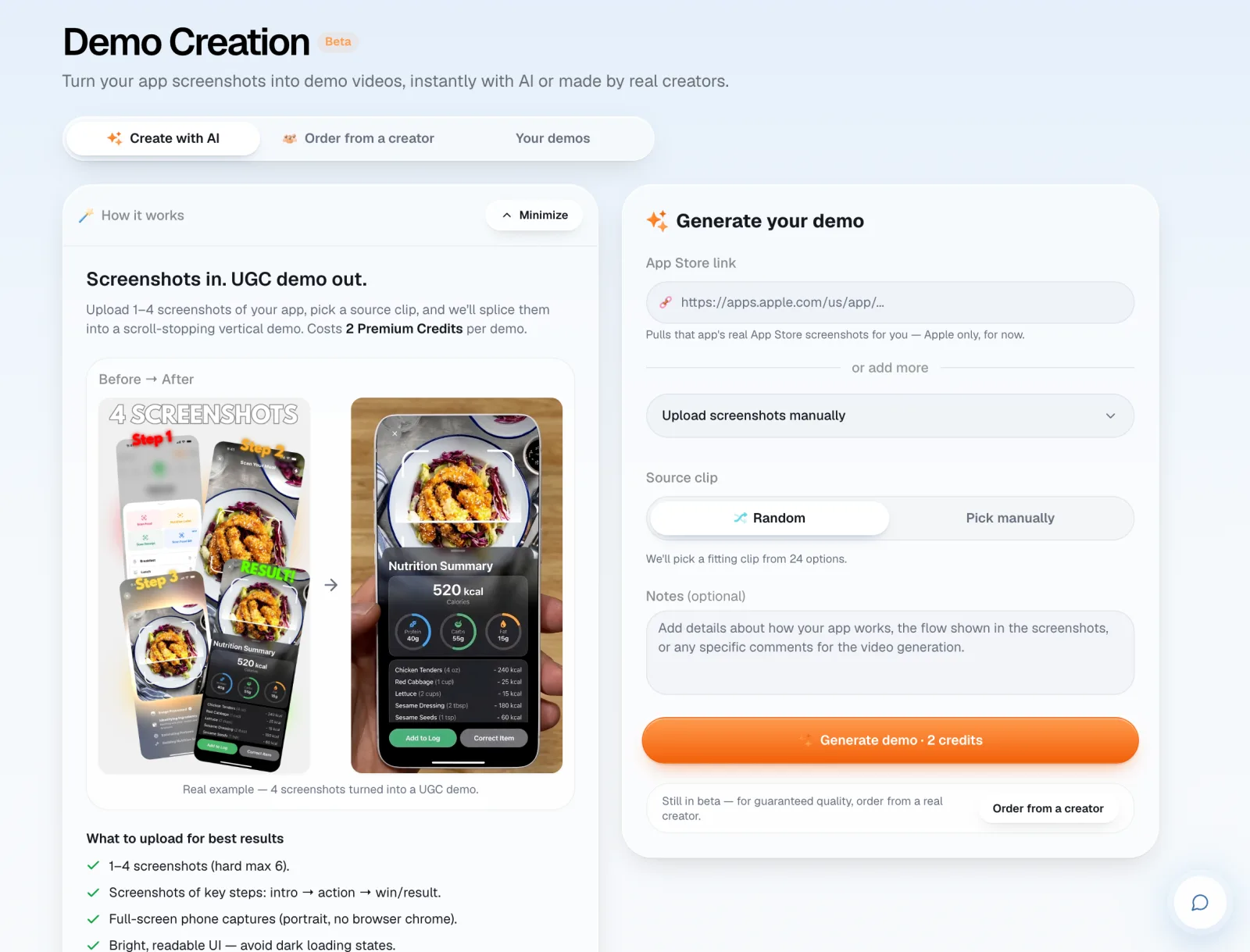
No demo footage yet? The Demo Creator (in beta) pulls your app's screenshots from an App Store link, or takes screenshots you upload, and turns them into a vertical hand-and-phone demo.
Make an app ad in Studio or browse the clips.
Why UGC works so well for apps
Simonas, UGCdrop's founder, has run UGC for four years. His take: UGC for apps is far easier to mass-produce than UGC for physical products.
With an app, the whole sale is a simple payoff on a phone screen. Type a question, get the answer. Snap a meal, see the calories. Nobody has to touch anything.
Physical products are harder. You have to show how they work, the features and why they beat the alternative. Someone puts on the clothes, explains the perfume, demonstrates the plunger. Emotion helps, but as Simonas puts it, a surprised face alone doesn't sell a toilet plunger. It can sell an app, because the demo does the rest.
That's why the same structure works across almost every app category:
Hook (2 to 3 seconds): a real person reacts, with a text line in your user's words.
Demo (10 to 20 seconds): one to three steps on screen. Not a tutorial.
Payoff: the result, shown clearly. Then a short call to action.
UGC for travel, fitness, productivity and finance apps
The structure stays the same. What changes is the face, the setting and the hook. Match the creator to your user: someone at a laptop for desktop software, someone outdoors for a travel app.
Travel apps
Face: an excited or surprised reaction, ideally outdoors or in a car. Hook ideas: "I found flights to Lisbon for less than my Uber home" or "POV: you stopped planning trips in 14 browser tabs." Demo: search, one result, the price or itinerary.
Fitness apps
Face: a frustrated or tired reaction for the problem, or excited for the result. Workout clothes help. Hook ideas: "I didn't know my 45-minute workouts were the problem." Demo: pick a goal, see the plan, tick off day one.
Productivity apps
Face: someone at a laptop or desk, shocked or relieved. Hook ideas: "This app plans my whole week in 30 seconds." Demo: paste a messy list, watch it become a schedule.
Finance and other apps
Face: a shocked reaction works well for money, one of the strongest status-linked themes, along with fitness and beauty. Hook ideas: "I checked where my money went last month and wanted to cry." Demo: connect an account, see the spending breakdown, set one rule. Keep claims honest: don't promise returns.
Need more lines? Start from our UGC ad hooks or the 4,600+ ready-made hooks inside Studio (paid plans).
What Sideshift teaches app marketers
Sideshift is a creator marketing platform. It says it's trusted by 3,000+ brands, and Replit is one of the names on its homepage. Its model is worth studying even if you never use it.
The playbook on its site is simple: post a brief, get creators applying, track which organic posts perform, then run the winners as paid ads on Meta and TikTok. Plans start at $299 a month, and Sideshift recommends a separate creator budget of $2,000 to $5,000 a month on that plan.
Simonas's lesson from studying it: run a lot of content first, then double down on what works. Bigger teams do exactly that at scale, with many different real creators. It's the same approach UGCdrop takes, at library prices instead of creator fees.
| Creator program (Sideshift-style) | Clip library (UGCdrop) | |
|---|---|---|
| Starting cost | $299/mo software + $2,000 to $5,000/mo creators | $48/mo (Pro) or $99/mo (Unlimited) |
| Cost per video | Creator rates, often ~$100+ | From $0.50 |
| Time to first ad | Days, after creators apply and post | Minutes |
| Organic reach from creator accounts | Yes | No, you post from your own accounts |
| Custom scripts and app walkthroughs | Yes | No, use text hooks + your demo |
| Best for | Funded apps scaling a proven angle | Finding the winning hook fast and cheap |
When you need real creators instead
Library clips don't cover everything. Hire creators, through a platform like Sideshift or directly, when:
You want reach from the creators' own accounts. A library clip runs on your accounts and ads, not theirs.
You need someone to talk through your app on camera, using it for real.
You need a testimonial. Those must come from real users.
The cheapest path for most app teams: find the winning hook and angle with library clips first, then pay creators to film more of what already works. If you want a real person filming your app without managing freelancers, the Demo Creator also has an "order from a creator" option.
How to make a UGC app ad in UGCdrop
Get your demo. Record one to three steps on your phone. Or open the Demo Creator, paste your App Store link or upload 1 to 4 screenshots, and get an AI demo back. AI demos cost 2 Premium Credits each.
Write five hooks. In Studio, type hooks in your user's words. One hook makes one video.
Pick the faces. Filter the library to Real, then by emotion and setting. Surprised, shocked and excited reactions are the most downloaded on UGCdrop.
Add music and render. Rendering is free. Download the versions you want to run.
Test, then double down. Post or run all five, keep the winner, and make ten more like it. Re-using clips you already downloaded costs no extra credits.
This is the format Simonas used for Tikomate, his digital product. It sold hundreds of copies, brought in around 2,000 leads, and the videos average around 100,000 views each. For a walkthrough without creators, see how to get UGC ads without creators, and for TikTok specifics, UGC for TikTok ads.
FAQ
What is UGC for apps?
It's creator-style video made to promote an app: usually a real person's reaction as the hook, followed by a short screen recording of the app delivering a result.
How much does app UGC cost?
Hiring creators usually costs around $100 or more per video. On UGCdrop, real creator clips start at $0.50 each on the Unlimited plan ($99 a month for 200 downloads), and rendering ads in Studio is free.
Do I need creators to use my app on camera?
No. For most app ads, the creator only reacts. Your screen recording shows the app. You need creators on camera only for walkthroughs or testimonials.
Does UGC work for SaaS and B2B apps too?
Yes. Use creators at a laptop or desk, and a desktop screen recording as the demo. Hooks about saved time or avoided mistakes work well.
How do I make an app demo video without filming?
Use UGCdrop's Demo Creator. Paste an App Store link (Apple only for now) or upload 1 to 4 screenshots, and it composites them onto real hand-and-phone footage.
How many app UGC videos should I test?
More than you think. Start with five or more hooks, keep the winner, and make many variations of it. Volume of bad hooks doesn't help, so change the angle, not just the face.
Can I use UGCdrop clips in paid app install ads?
Yes. Clips are licensed for your own paid and organic ads on any platform. You can't resell them or use them in deceptive ads, and testimonials should come from real users.
Bottom line
Apps are the easiest product to sell with UGC: a real reaction, a hook in your user's words, and a three-step demo. Test lots of versions, then double down on what works, the same way big creator programs do. UGCdrop lets you do it with real creator clips from $0.50 each, plus a Demo Creator if you have no footage yet.